



- Gateway:
vpn3.uib.no - User Agent:
AnyConnect Linux_64 4.7.00136
I just moved to Bergen for my Erasmus stay during the whole 2026/27 academic year, and was dissapointed (but not surprised) that they used Cisco’s AnyConnect VPN here. I had no other choice than using it, because it is needed to access the virtual campuse (Mitt UiB) and other important things. But at least I should be able to avoid the official, propietary, client (but at least the Linux version does exist, atlhough I would have to get creative for it to work on NixOS).
So, this isn’t complicated at all, but I wanted to make this post so I don’t forget if I change laptop and also to write the paragraph above crying a little about the situation (and don’t get me started on the whole Microsoft ecosystem on almost every university around the globe). I also hope this can help someone along the way.
There are already tutorials out there
(Sergey Budaev’s,
Tim Harek’s), but it seems
that the User Agent is now checked, just set it to
AnyConnect Linux_64 4.7.00136 and that should be it. So:
Install OpenConnect#
I’m using OpenConnect for this, which you’ve probably already heard of. Just install it, and probably the integration with NetworkManager (if it is a separate package in your distro) will be useful too 😉.
Connect !#
Just create a new VPN Connection in your NetworkManager GUI and set:
- VPN Protocol:
Cisco AnyConnect - Gateway:
vpn3.uib.no - User Agent:
AnyConnect Linux_64 4.7.00136
The clue that the User Agent is checked is from this thread in the Arch Linux Forums
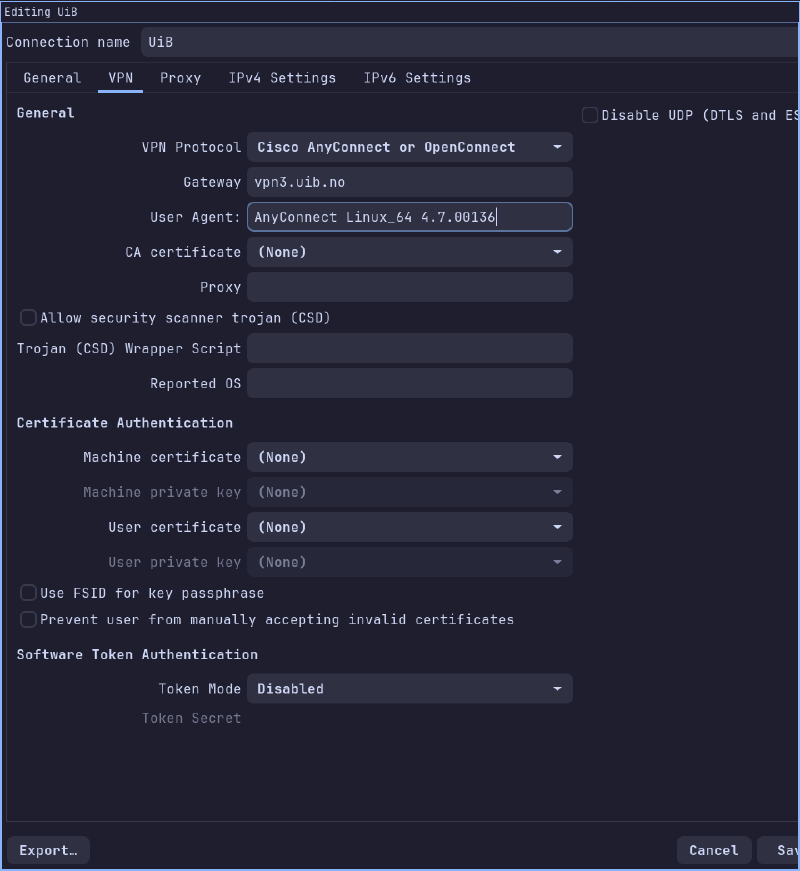
Now Save, Connect, sign in using your UiB Microsoft account and that should be it 👍.